Beauty

From the color chair to the rebook, one system for your salon.

Book a blow-dry while color processes, take a deposit on a big transformation and rebook clients before they leave. Square Appointments handles the scheduling; Payaroo helps you set it up for your team.

Get started

Square, made easier with Payaroo.

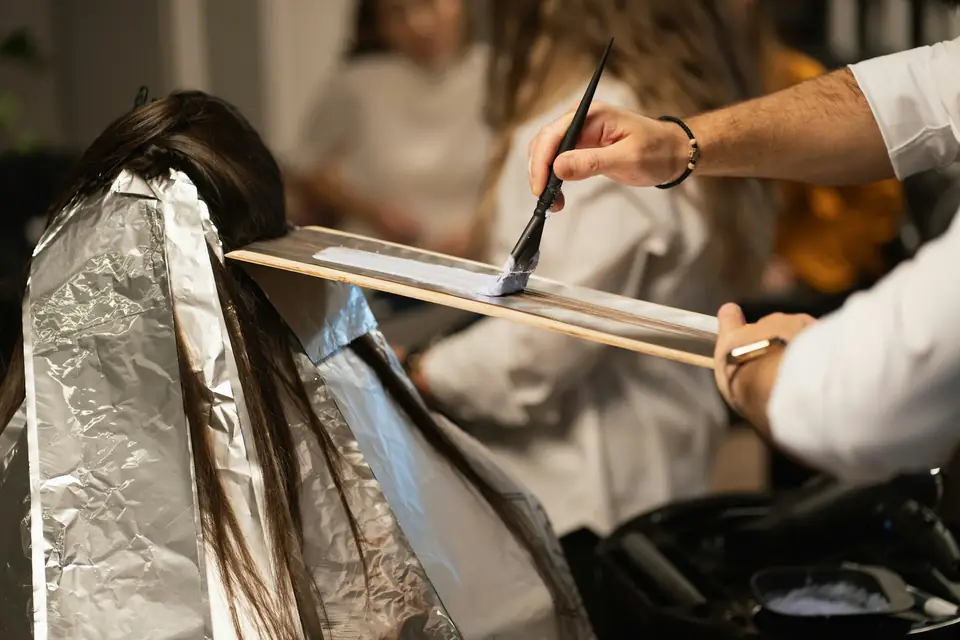
Stylist applying hair color with foils in a salon

What your hair salon needs

Salon time comes in layers.

A hair salon books in layers. Color goes on, and while it processes the stylist can fit in a blow-dry or a trim before coming back to rinse and finish. A balayage or a full set of extensions can hold a chair for hours, so a no-show on one of those costs far more than a missed trim.

Clients come back on a rhythm, every six weeks for a cut or every eight for a root touch-up, and the easiest time to book the next visit is at the desk before they walk out. A setup that fits handles processing time and protects the long bookings. It pays each stylist correctly and keeps color formulas where the next stylist can find them.

Idle time during processing

Color sits for 30 to 45 minutes, and the calendar shows the stylist as busy the whole time.

How Square helps Processing time splits a service into application, processing and finishing, so another client can be booked into the gap on a paid Square plan.

Processing time

Four-hour no-shows

A client skips a balayage appointment you turned other bookings away for.

How Square helps Ask for a deposit on color and extensions at online booking. On a paid plan, show a cancellation policy, require full prepayment and charge no-show fees to the card on file.

Deposits at booking No-show protection Card on file

Formulas in a notebook

The color formula is in one stylist's notebook, and the client sees someone else next time.

How Square helps Client profiles keep dated notes, photos and visit history, so any stylist can pull up last visit's formula and the before-and-after shots.

Client profiles and notes

Payday math

Commission on services, a different rate on retail and tips on top, all worked out by hand every pay period.

How Square helps Commission tracking credits flat or tiered rates, by service revenue or items sold, as each sale happens. Tips are credited too, and the totals can be imported into Square Payroll.

Commission tracking Square Payroll

How Payaroo helps

Square, made easier with Payaroo.

Tell us how your business works. We'll help you understand the Square tools that fit.

  1. Tell us how you work Where you take payments, how customers book or order, who's on your team.
  2. See the setup that fits We map the Square hardware, software and payment options to your day — and skip what you don't need.
  3. Apply with Square Square reviews every application and verifies your identity and business before approving an account.
  4. Get up and running Help with setup and onboarding, and a real person to call at Payaroo when questions come up.

Core capabilities

What Square can do for your hair salon

Book the gap while color processes

Split a color service into an initial period, a processing period and a final period, and the processing window opens for another client. Square's own example is a blow-dry during color. Processing time needs a paid Square plan.

Permissions for every role

Give each stylist a passcode and a permission set, so an assistant can check clients out without opening reports and a stylist can see only their own calendar. Square Plus and Premium allow unlimited custom permission sets.

Reminders and replies in one place

Automatic text and email reminders go out before each appointment, and client replies land in Square Messages instead of on a stylist's personal phone.

Hardware options

Hardware that fits a hair salon

You don't need every device. Start with what matches where you take payments — and add more later.

Hardware

Square Register

A countertop point of sale with two touchscreens: one for your team and one that faces the customer.

The front desk's checkout: the coordinator books the next color appointment while the client adds a tip on the customer-facing screen.

  • Takes tap and chip payments; add the magstripe reader if you still swipe
  • Customer-facing screen for tips, order confirmation and receipts
  • Runs on its own — no tablet needed
Hardware

Square Stand

A countertop stand that turns a compatible iPad into a point of sale, with a card reader built in.

If your salon already has a compatible iPad, Stand turns it into a checkout that swivels toward the client for the tip.

  • Takes tap and chip payments; swiping needs the separate magstripe reader
  • Swivels toward the customer to tip and pay on the same screen
  • Needs a compatible USB-C iPad
Hardware

Square Terminal

A compact, battery-powered card machine with a built-in receipt printer.

For stylists who check clients out at their own chair: it's battery-powered and prints the receipt itself.

  • Takes tap, chip and swipe payments
  • The only Square device with a receipt printer built in
  • All-day battery, so it can move to the table, the curb or the job

Software and tools

The software side of your hair salon

How it works

A Tuesday behind the chair

One realistic day at a hair salon, with the setup above doing the work.

  1. Booked on Sunday night A client books a root touch-up and a cut online on Sunday night and pays the deposit you set for color services.
  2. Color, then a blow-dry Her color goes on at 10 a.m. While it processes, the stylist's next client sits down for a blow-dry booked into the gap.
  3. Formula on file The stylist checks last visit's formula on her profile and adds today's to a new dated note.
  4. Checkout and rebook At the desk she buys a color-safe shampoo, tips on the screen and books her next touch-up eight weeks out.
  5. Payday without the math At the end of the pay period, commissions and tips for each stylist are in reports, ready to import into Square Payroll.

Setup finder

Let's find the right setup.

Answer a few quick questions about your hair salon. We'll stop as soon as we can point you to a useful starting setup.

Not sure what you need? Ask Buckaroo.

Tell Buckaroo how your business works and he'll help you figure out which Square tools make sense.

Get started

FAQs

Hair Salons: common questions

What's the right Square hardware for a hair salon?

Salons with a front desk often use Square Register, or Square Stand with a compatible iPad, plus a receipt printer and a cash drawer if they take cash. Stylists who check out at the chair can use Square Terminal. Some salons run both, with the desk handling rebooking and product sales.

Can I book another client while color processes?

Yes, on a paid Square plan. Processing time splits a service into an initial period, a processing period and a final period, and the processing period stays open for another booking. You can also block extra time after a service to clean the station or mix the next formula.

Can booth renters use Square at my salon?

Booth rental takes some planning. Square notes that booth and room renters can't use booking through Google, since that requires owning or leasing the space. If renters want their own payouts, talk to Payaroo before anyone signs up, and we'll help you work out how the accounts should be set up.

How do commissions and tips work for stylists?

With commission tracking on a paid Square plan, you set no commission, a flat rate or tiered rates for each stylist, based on service revenue or on the number of services or items sold. Commissions and tips are credited when the sale happens, show up in reports and can be imported into Square Payroll.

Which Square plan does a hair salon need?

Square publishes its own plans and rates. Square Free carries processing fees but no monthly subscription, and it covers the booking site, stylist calendars and deposits. Processing time, no-show fees, full prepayment and commission tracking need a paid plan. Loyalty and marketing come with Square Plus and Premium, and Square Payroll is a separate add-on. Current rates are on Square's pricing page, and we can help you size a plan to your team.

How do I move my salon onto Square?

Tell us about your stylists, services and front desk, and we'll suggest a starting setup. Square reviews each application, verifying the owner's identity and the salon as a business, and approves the account only after that. Then Payaroo helps you build your service menu, set your policies and bring your client list over.

Set up a calendar your stylists can work from.

Tell us how your chairs, stylists and front desk run, and we'll help you choose the Square tools that match.

Square reviews and approves every account. Call Payaroo at 972-431-0439.

Square is a product of Block, Inc. Square, the Square logo and related marks are trademarks of Block, Inc. and/or its subsidiaries. Payaroo is an independent company. Payaroo is not Square or Block, and nothing on this page describes a partnership, reseller relationship, certification or endorsement.

Square product details on this page were checked against Square's website on September 25, 2026. Square sets its own features, plans, pricing, fees, eligibility and hardware availability, and these can change. Confirm current details on Square's website before you sign up. Square pricing · Square fees

Square reviews every account application, including identity and business verification, and decides whether to approve it. Payaroo can't guarantee approval, pricing, processing terms or the availability of any feature.

Products and services displayed by Payaroo may be provided by independent third-party companies. Product availability, pricing, features, eligibility, underwriting requirements, funding amounts, insurance benefits, payment-processing terms, and other conditions vary by provider and customer. Payaroo is not a bank, lender, insurer, or healthcare provider unless expressly stated otherwise. Review the applicable provider agreements and disclosures before enrolling in or accepting any product or service. See our Disclosures, Terms of Use and Privacy Policy.