Beauty

Keep every chair turning, from the first fade to the last shave.

Take bookings online, fit walk-ins in between and check out at the chair with a phone or Square Terminal. Loyalty points give regulars a reason to keep coming back, and Payaroo walks you through the setup.

Get started

Square, made easier with Payaroo.

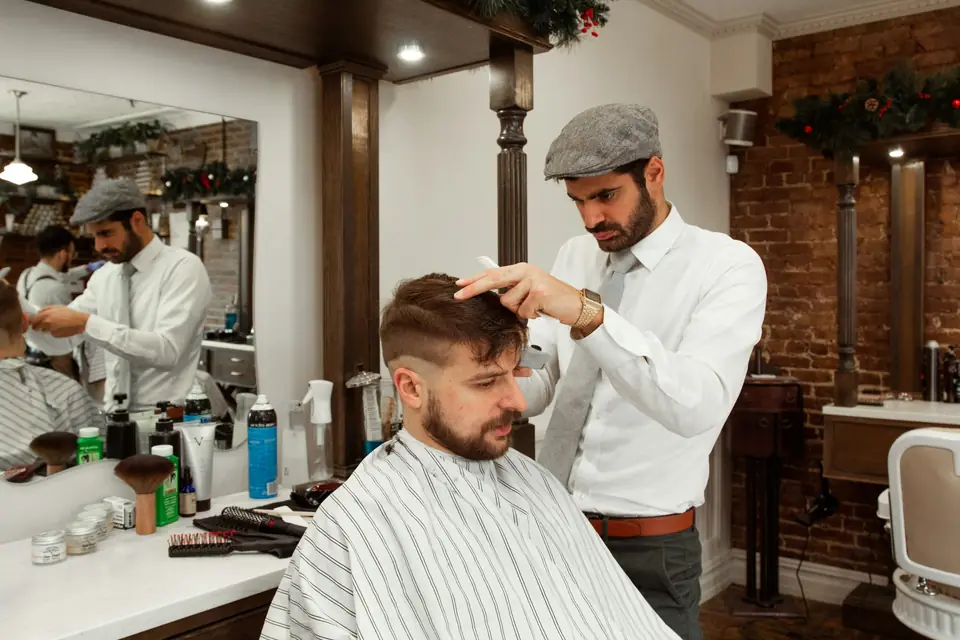
Barber styling a client's hair in a classic barbershop

What your barbershop needs

Walk-ins still matter here.

Barbershops run on two kinds of clients: regulars who book the same barber every two weeks and walk-ins who want the next open chair. Saturday brings a full bench, and cash, tips and a single register make the numbers hard to track.

A setup that fits puts appointments and walk-ins on the same calendar and lets each barber take payment at the chair. It sells the pomade on the shelf through the same system and shows each barber's day in one report.

Walk-ins between appointments

Two clients walk in while your 3 p.m. is due, and nobody's sure which barber is free.

How Square helps Square doesn't run a walk-in queue, so book each walk-in onto the calendar with an open barber. Your booking site then offers only the times that are still free.

Staff calendars Online booking

One register, six chairs

Clients walk back to a single register while the next client waits in the chair.

How Square helps Each barber takes payment at the chair with Tap to Pay on a phone or with Square Terminal, and the tip prompt appears right there.

Tap to Pay on iPhone and Android Square Terminal Tipping at checkout

Friday no-shows

A regular misses his Friday fade, and the slot goes unused at the busiest time of the week.

How Square helps Automatic text reminders go out before every cut. On a paid plan, add a cancellation policy clients see when they book, a card requirement and a no-show fee.

Automatic reminders No-show protection

Regulars who drift

A client who came every two weeks hasn't been back in two months.

How Square helps Loyalty points on every cut, plus win-back emails and texts to clients who opted in. Both come with Square Plus and Premium.

Square Loyalty Square Marketing

How Payaroo helps

Square, made easier with Payaroo.

Tell us how your business works. We'll help you understand the Square tools that fit.

  1. Tell us how you work Where you take payments, how customers book or order, who's on your team.
  2. See the setup that fits We map the Square hardware, software and payment options to your day — and skip what you don't need.
  3. Apply with Square Square reviews every application and verifies your identity and business before approving an account.
  4. Get up and running Help with setup and onboarding, and a real person to call at Payaroo when questions come up.

Core capabilities

What Square can do for your barbershop

Every barber, their own book

Each barber gets a bookable profile with their own services and hours, and clients pick the barber they want online. Permissions decide whether barbers see only their own calendar or the whole shop's.

A waitlist for a full Saturday

When the book is full, clients can join a waitlist from your booking site and get a notice if a matching time opens. It needs a paid plan and an online booking site, so walk-ins still go straight onto the calendar.

Bring back the overdue regular

Automated win-back and birthday messages go to clients who haven't been in lately, and texts reach those who opted in. Email and text marketing need Square Plus or Premium.

Hardware options

Hardware that fits a barbershop

You don't need every device. Start with what matches where you take payments — and add more later.

Payments

Tap to Pay on iPhone and Android

Accept contactless cards and phone wallets on your own phone with no extra hardware.

Any barber with an iPhone XS or newer, or an NFC-capable Android phone, can take tap payments at the chair. It won't work offline, so the shop's Wi-Fi matters.

  • Works in the Square Point of Sale app in the US
  • iPhone XS or newer, or an NFC-capable Android phone on Android 9 or later
  • Needs an internet connection (not available offline)
Hardware

Square Terminal

A compact, battery-powered card machine with a built-in receipt printer.

One per chair or one to share: it takes tap, chip and swipe and prints receipts.

  • Takes tap, chip and swipe payments
  • The only Square device with a receipt printer built in
  • All-day battery, so it can move to the table, the curb or the job
Hardware

Square Stand

A countertop stand that turns a compatible iPad into a point of sale, with a card reader built in.

A front-counter checkout on a compatible iPad for shops with a desk, including Cash App Pay at checkout.

  • Takes tap and chip payments; swiping needs the separate magstripe reader
  • Swivels toward the customer to tip and pay on the same screen
  • Needs a compatible USB-C iPad
Hardware

Square Reader (contactless and chip)

A small Bluetooth card reader that pairs with your phone or tablet.

Pairs with a barber's phone over Bluetooth to take chip cards as well as taps.

  • Takes tap and chip cards plus phone wallets
  • Works with iPhone, iPad and Android devices
  • All-day battery; easy to carry to markets, events and job sites

Software and tools

The software side of your barbershop

How it works

Saturday at the shop

One realistic day at a barbershop, with the setup above doing the work.

  1. Booked from Instagram A regular taps Book Now on your Instagram profile and picks his usual barber for 10:30.
  2. A walk-in at 11 A walk-in asks for a lineup. The counter puts him on the calendar under the barber with the open chair, so nobody online books over him.
  3. Running late Your 1 p.m. texts that he's running behind. The message lands in the shop inbox, and Square Assistant moves him to a later time.
  4. Paid at the chair After the fade, the barber takes payment on his phone with Tap to Pay. The client adds a tip and a tin of pomade.
  5. Close out At close, reports show each barber's sales, and the pomade turns up in the low-stock email.

Setup finder

Let's find the right setup.

Answer a few quick questions about your barbershop. We'll stop as soon as we can point you to a useful starting setup.

Not sure what you need? Ask Buckaroo.

Tell Buckaroo how your business works and he'll help you figure out which Square tools make sense.

Get started

FAQs

Barbershops: common questions

What do barbers need to take payments at the chair?

Many barbers start with Tap to Pay on an iPhone or Android phone, which needs no extra hardware but does need internet. Square Terminal adds chip, swipe and a built-in printer, and Square Reader pairs with a phone for chip cards. A shop with a front counter can add Square Stand or Square Register.

Can I take walk-ins and appointments with Square?

Yes, on the same calendar. Square doesn't have a walk-in queue or check-in list, so add each walk-in to the calendar under the barber who takes them. The waitlist, on a paid plan, tells clients about openings on your booking site; it doesn't track people waiting on the bench.

Can I rent chairs to barbers who want their own payouts?

Booking through Google isn't open to booth and room renters, Square notes, because it's limited to businesses that own or lease their premises. If your renters want payments going to their own bank accounts, talk to Payaroo about how the accounts should be set up before anyone signs up.

Can clients pay with Cash App or Afterpay?

Cash App Pay works in person on Square Register, Stand and Terminal, where the client scans a QR code with Cash App. Afterpay is open to approved business categories, with amount limits, and you're paid up front. Neither works offline.

What will Square cost my barbershop?

Square sets and publishes its own prices. There's no monthly subscription on Square Free. The shop pays processing fees on card payments and still gets the booking site, barber calendars and Tap to Pay. Plus and Premium add loyalty and marketing. The waitlist and no-show fees need a paid plan, and reserving chairs as resources needs Premium. Look up current rates on Square's pricing page, and we'll help you figure out which features your shop would actually use.

What's the first step for my shop?

Tell us how many chairs and barbers you have and how much of your day is walk-in. Square reviews the application and verifies your identity and your business before approving an account, and Payaroo helps from there with services, barber profiles and your booking link.

Let's get your chairs on one calendar.

Tell us how your shop runs, from walk-ins to regulars, and we'll help you put the Square setup together.

Square reviews and approves every account. Call Payaroo at 972-431-0439.

Square is a product of Block, Inc. Square, the Square logo and related marks are trademarks of Block, Inc. and/or its subsidiaries. Payaroo is an independent company. Payaroo is not Square or Block, and nothing on this page describes a partnership, reseller relationship, certification or endorsement.

Square product details on this page were checked against Square's website on September 25, 2026. Square sets its own features, plans, pricing, fees, eligibility and hardware availability, and these can change. Confirm current details on Square's website before you sign up. Square pricing · Square fees

Square reviews every account application, including identity and business verification, and decides whether to approve it. Payaroo can't guarantee approval, pricing, processing terms or the availability of any feature.

Products and services displayed by Payaroo may be provided by independent third-party companies. Product availability, pricing, features, eligibility, underwriting requirements, funding amounts, insurance benefits, payment-processing terms, and other conditions vary by provider and customer. Payaroo is not a bank, lender, insurer, or healthcare provider unless expressly stated otherwise. Review the applicable provider agreements and disclosures before enrolling in or accepting any product or service. See our Disclosures, Terms of Use and Privacy Policy.