Food & Beverage

Know what's left in the case and what's already ordered.

Ring up the pastry case fast, take preorders for holidays and pickups, collect cake deposits by invoice and set daily counts that reset each morning — with Payaroo helping you set up Square for your bakery.

Get started

Square, made easier with Payaroo.

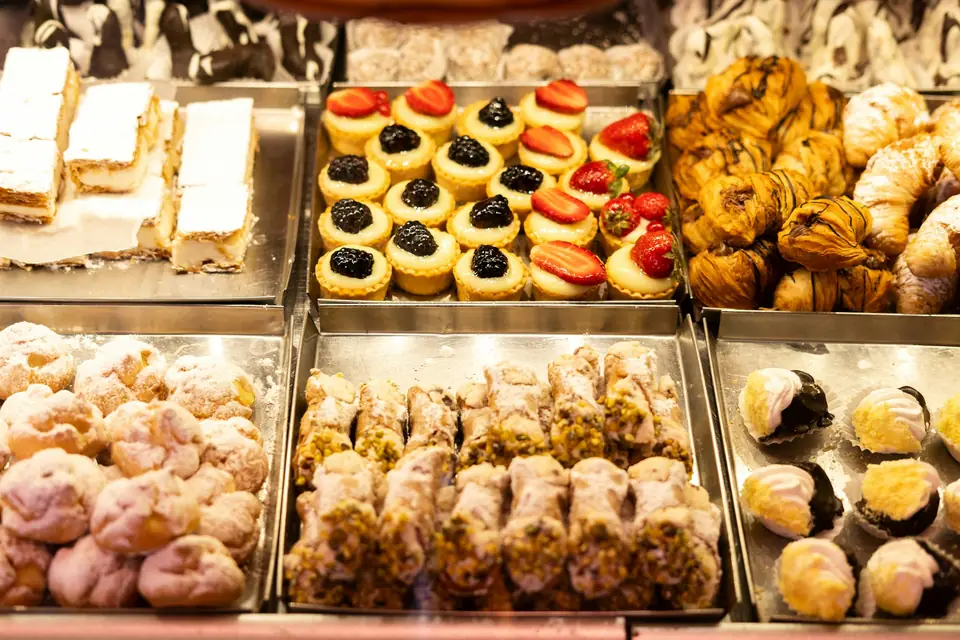
Bakery display case filled with pastries, tarts and cannoli

What your bakery needs

The oven schedule starts yesterday.

A bakery bakes before it sells. Tomorrow's croissant count depends on today's orders, the holiday pie list closes days ahead and a custom cake means a deposit, a design, a pickup time and a phone call if anything changes.

At the counter, speed matters: guests point at the case, you box a half dozen and ring it up. Behind the counter, you need preorders you can plan around, counts that tell staff what's left and a clean way to bill the café down the street that takes bread every morning.

The Saturday line

The case is full, the line is out the door and every order mixes pastries, loaves and coffee.

How Square helps Square Register keeps the counter moving with a customer-facing screen for tipping and tapping, and Square Kiosk lets guests order and pay on their own.

Square Register Square Kiosk

Holiday preorders

Pie and challah orders come in by phone, email and notes on the counter, and nobody knows the real count.

How Square helps Online preorders let customers reserve items for pickup during a date range you set, with a cut-off, and your ordering page takes scheduled pickups days ahead. Preorders need a paid Square plan.

Online preorders Order ahead

Custom cakes

A three-tier wedding cake needs a deposit, a design agreed in writing and a pickup date nobody can miss.

How Square helps There's no dedicated cake-order form in Square, so you use the tools around it: a future order for the pickup date and time, or an invoice with a deposit and the design photos attached.

Future orders Deposits and payment schedules Photos and files on invoices

Promising what's gone

Staff keep promising sourdough that sold out an hour ago.

How Square helps Give each item a daily available count that goes down with every sale at the counter and online and resets on the schedule you choose, so staff can see what's left before they promise it.

Sold-out (86) controls

How Payaroo helps

Square, made easier with Payaroo.

Tell us how your business works. We'll help you understand the Square tools that fit.

  1. Tell us how you work Where you take payments, how customers book or order, who's on your team.
  2. See the setup that fits We map the Square hardware, software and payment options to your day — and skip what you don't need.
  3. Apply with Square Square reviews every application and verifies your identity and business before approving an account.
  4. Get up and running Help with setup and onboarding, and a real person to call at Payaroo when questions come up.

Core capabilities

What Square can do for your bakery

Counts that reset every morning

Give each item a daily count — two dozen croissants, say — and it drops as they sell at the counter and online, then resets overnight on the schedule you set.

Holiday preorders

Open preorders for pies and rolls with pickup days in a set date range and a cut-off, so you know the count before you bake. Online preorders run on your Square website and need a paid Square plan.

Custom cake pickups

Enter a cake order in Order Manager with its pickup date and time. For bigger jobs, send an invoice with a deposit and attach the design sketch or inspiration photos.

By the pound or by the piece

Sell cookies by the dozen, bread by the loaf and fudge or granola by the pound, with the weight typed in or read from a connected scale with tare.

Hardware options

Hardware that fits a bakery

You don't need every device. Start with what matches where you take payments — and add more later.

Hardware

Square Register

A countertop point of sale with two touchscreens: one for your team and one that faces the customer.

The counter station beside the case, with a customer-facing screen for tips and taps.

  • Takes tap and chip payments; add the magstripe reader if you still swipe
  • Customer-facing screen for tips, order confirmation and receipts
  • Runs on its own — no tablet needed
Hardware

Square Stand

A countertop stand that turns a compatible iPad into a point of sale, with a card reader built in.

Turns a compatible iPad into the bakery's register, with a card reader built in and a screen that swivels to the customer.

  • Takes tap and chip payments; swiping needs the separate magstripe reader
  • Swivels toward the customer to tip and pay on the same screen
  • Needs a compatible USB-C iPad
Hardware

Square Kiosk

A self-ordering station: an iPad in Square's kiosk enclosure where customers build, customize and pay for their own orders.

A self-order screen for coffee-and-pastry orders during the weekend rush.

  • Takes tap and chip payments at the kiosk
  • Works alongside a Square POS device that routes orders to kitchen printers or a kitchen display
  • Wall, counter and floor-stand mounting options
Paid plan + per-device add-onGet started with Payaroo: Square Kiosk
Accessory

Scales

Compatible scales that fill in the weight and price for items sold by weight.

For fudge, cookies or bulk items priced by weight; the scale fills in the weight and price.

  • USB and Bluetooth models; Square says scales work in all POS modes
  • Supports tare and price-embedded barcodes

Software and tools

The software side of your bakery

How it works

A Saturday at the bakery

One realistic day at a bakery, with the setup above doing the work.

  1. Before open The daily counts reset overnight to the numbers you set, so staff start the day knowing how many croissants, loaves and morning buns are available.
  2. Pickups first Preorders and scheduled pickups from the ordering page are boxed and waiting by the register when the doors open.
  3. The case rush The line builds by 9. The kiosk takes coffee-and-pastry orders while the Register handles boxes and loaves.
  4. Sourdough sells out The last sourdough goes at 10:40. A staff member marks it sold out, and it drops off the ordering page and the delivery apps.
  5. Cake order A customer orders a birthday cake for next Saturday. You take a deposit by invoice and attach the design, or enter a future order with the pickup time.
  6. Wholesale run Monday's bread for the café down the street is billed by recurring invoice and charged to its card on file.

Setup finder

Let's find the right setup.

Answer a few quick questions about your bakery. We'll stop as soon as we can point you to a useful starting setup.

Not sure what you need? Ask Buckaroo.

Tell Buckaroo how your business works and he'll help you figure out which Square tools make sense.

Get started

FAQs

Bakeries: common questions

What does a bakery need to run Square at the counter?

Start with Square Register or an iPad on Square Stand, plus a receipt printer and a cash drawer. Busy shops add Square Kiosk for self-ordering, which needs a paid plan plus a per-device add-on, and a compatible scale if anything sells by weight.

Can customers preorder for holidays?

Yes, in two ways. Square Online Ordering lets customers schedule pickups days ahead with lead times and cut-offs, and online preorders on a Square website let them reserve items for pickup during a date range you choose. Preorders need a paid Square plan.

How do I handle custom cake orders?

Square doesn't have a dedicated custom-order tool, so you'd use what's there: a future order in Order Manager with the pickup date and time, or a Square invoice with a deposit and the design photos attached. Customer profiles keep notes on past orders and preferences.

Can I bill the cafés and restaurants I supply?

Yes. Square Invoices can send recurring invoices on a schedule and charge a saved card or a verified bank account automatically, with the customer's authorization. Recurring invoices are available on Square Free as well as the paid plans.

How much will Square cost my bakery?

Square sets its own pricing and lists it on its pricing page. Square Free has no monthly subscription (processing fees still apply) and covers counter checkout, online ordering and invoices. Online preorders, loyalty and marketing need Square Plus or Premium, and Square Kiosk adds a per-device add-on to a paid plan. We can help you figure out whether holiday preorders justify a paid plan for your shop.

What do I need to apply for Square?

You apply with Square directly. Square reviews each application and verifies your identity and business before approving an account, so have your business details and bank information handy. Tell us about your case, your preorders and any wholesale accounts, and Payaroo will help you set up items, counts and invoices.

Let's get your bakery counter set up.

Tell us about your case, your preorders and your wholesale accounts, and we'll help you fit Square around them.

Square reviews and approves every account. Call Payaroo at 972-431-0439.

Square is a product of Block, Inc. Square, the Square logo and related marks are trademarks of Block, Inc. and/or its subsidiaries. Payaroo is an independent company. Payaroo is not Square or Block, and nothing on this page describes a partnership, reseller relationship, certification or endorsement.

Square product details on this page were checked against Square's website on September 25, 2026. Square sets its own features, plans, pricing, fees, eligibility and hardware availability, and these can change. Confirm current details on Square's website before you sign up. Square pricing · Square fees

Square reviews every account application, including identity and business verification, and decides whether to approve it. Payaroo can't guarantee approval, pricing, processing terms or the availability of any feature.

Products and services displayed by Payaroo may be provided by independent third-party companies. Product availability, pricing, features, eligibility, underwriting requirements, funding amounts, insurance benefits, payment-processing terms, and other conditions vary by provider and customer. Payaroo is not a bank, lender, insurer, or healthcare provider unless expressly stated otherwise. Review the applicable provider agreements and disclosures before enrolling in or accepting any product or service. See our Disclosures, Terms of Use and Privacy Policy.