Services

Estimates approved, parts on the shelf and customers in the loop.

Write repair estimates, get a signed OK before extra work, keep parts and tires counted and answer customers from one shop inbox. Payaroo helps you set up the Square tools behind your service desk.

Get started

Square, made easier with Payaroo.

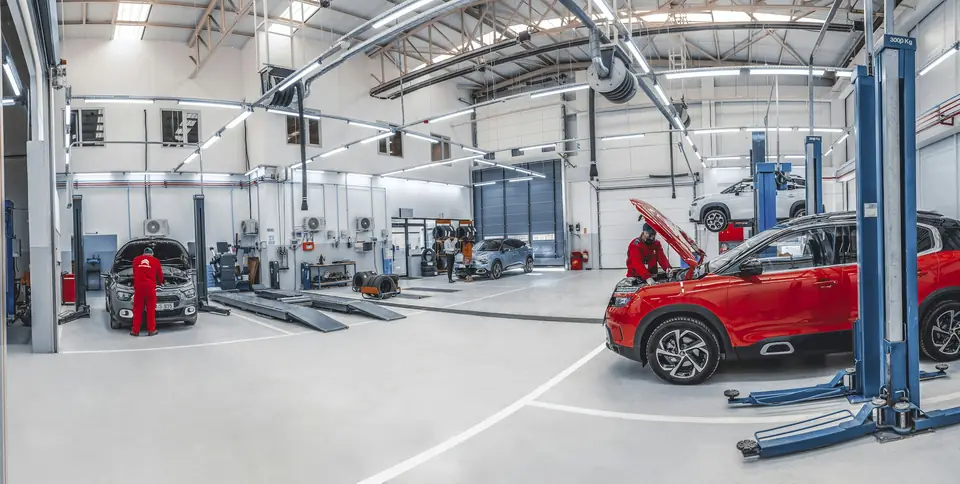
Mechanics working on cars in a bright repair shop

What your auto shop needs

Every car on the lift is waiting on a yes.

The customer drops off keys at 7:30 and wants the car back by five. In between, a tech finds worn pads, a torn CV boot or a nail in the sidewall, and nothing moves until the owner approves the extra work.

Shops run on that loop: an estimate the customer can read on a phone, a signature before the work, the right part on the shelf and a heads-up when the car is ready. Detailers, tint shops and car washes add repeat visits and memberships to the mix.

Cars waiting on approval

A tech finds more work mid-job, and the car sits on the lift until someone reaches the owner.

How Square helps Text an estimate with photos of the worn part and your repair authorization attached. The customer accepts and signs on their phone, and the bay keeps moving.

Estimates Photos and files on invoices Square Contracts

The part you needed is gone

A brake job stalls because the last set of pads went out yesterday and nobody noticed.

How Square helps Track parts and tire sizes as items with their own stock counts. When one drops below the threshold you set, it's flagged in your stock list and Square emails you after close.

Low-stock alerts Item variations

The phone that never stops

Customers call all afternoon to ask whether their car is done.

How Square helps Square Messages puts customer texts and emails in one shop inbox, off your personal phone. Replies are free; on a paid plan you can text first to say the car is ready.

Square Messages

One-visit customers

Someone comes in for a single oil change and you never see them again.

How Square helps On a paid plan, Square Marketing can send automatic win-back emails, or texts to customers who opted in, when someone hasn't been back in a while.

Square Marketing Customer Directory

How Payaroo helps

Square, made easier with Payaroo.

Tell us how your business works. We'll help you understand the Square tools that fit.

  1. Tell us how you work Where you take payments, how customers book or order, who's on your team.
  2. See the setup that fits We map the Square hardware, software and payment options to your day — and skip what you don't need.
  3. Apply with Square Square reviews every application and verifies your identity and business before approving an account.
  4. Get up and running Help with setup and onboarding, and a real person to call at Payaroo when questions come up.

Core capabilities

What Square can do for your auto shop

Estimates the customer can read

Build the estimate with parts and labor, attach photos of the scored rotor and send it by text or email. The customer accepts online and you turn it into the invoice; automatic conversion and multi-option estimates need a paid plan.

A signed OK before the extra work

Use a Square Contracts template as your repair authorization or damage waiver and attach it to the estimate or appointment. The customer signs on their phone and gets a PDF copy. Square says it doesn't offer legal advice, so the terms come from your shop.

Every tire size, counted

Set up a tire as one item with each size as a variation, each with its own price, SKU and stock count. Parts and tires sold at the counter or added to an invoice come out of stock.

Reminders before every drop-off

Square Appointments sends confirmation requests and reminders by text and email at the times you pick, and resends the confirmation request if the customer hasn't answered.

Service writers, techs and access

Custom permission sets with passcodes decide what each writer and tech can do on the POS and Dashboard. Schedules, timecards and labor-versus-sales reports come with Square Shifts on a paid plan.

Wash clubs and detail plans

Square Subscriptions can bill an unlimited-wash club or a monthly detail plan on a paid plan. It charges members on schedule but doesn't track how many washes they've used, so count visits another way.

Hardware options

Hardware that fits a auto shop

You don't need every device. Start with what matches where you take payments — and add more later.

Hardware

Square Register

A countertop point of sale with two touchscreens: one for your team and one that faces the customer.

A two-screen service desk: the customer checks the total and pays on their own screen while the writer closes out the repair order.

  • Takes tap and chip payments; add the magstripe reader if you still swipe
  • Customer-facing screen for tips, order confirmation and receipts
  • Runs on its own — no tablet needed
Hardware

Square Stand

A countertop stand that turns a compatible iPad into a point of sale, with a card reader built in.

Turns the shop's iPad into a counter POS with a built-in card reader that swivels toward the customer.

  • Takes tap and chip payments; swiping needs the separate magstripe reader
  • Swivels toward the customer to tip and pay on the same screen
  • Needs a compatible USB-C iPad
Hardware

Square Terminal

A compact, battery-powered card machine with a built-in receipt printer.

Walks out to the lot for curbside pickups and prints the receipt there. It runs on the shop's Wi-Fi.

  • Takes tap, chip and swipe payments
  • The only Square device with a receipt printer built in
  • All-day battery, so it can move to the table, the curb or the job
Hardware

Square Reader (contactless and chip)

A small Bluetooth card reader that pairs with your phone or tablet.

Pairs with a phone for mobile mechanics and detailers working in driveways and office parking lots.

  • Takes tap and chip cards plus phone wallets
  • Works with iPhone, iPad and Android devices
  • All-day battery; easy to carry to markets, events and job sites

Software and tools

The software side of your auto shop

How it works

A brake job, drop-off to pickup

One realistic day at a auto shop, with the setup above doing the work.

  1. Booked online A customer books a brake inspection for Tuesday at 8 a.m. on your booking site and gets a reminder the evening before.
  2. Photos and an estimate The tech finds pads worn to the backing plate. The service writer texts an estimate with two photos and your repair authorization attached.
  3. Approved from her desk She texts back a question about the rotors and the writer answers from Square Messages. Then she accepts the estimate and signs on her phone.
  4. Parts off the shelf The pads and rotors go on the invoice and come out of your stock count. By three the car is off the lift and the invoice is on her phone.
  5. Paid before pickup She pays online from work and grabs her keys at five. After close, Square emails you that those pads are below your reorder point.

Setup finder

Let's find the right setup.

Answer a few quick questions about your auto shop. We'll stop as soon as we can point you to a useful starting setup.

Not sure what you need? Ask Buckaroo.

Tell Buckaroo how your business works and he'll help you figure out which Square tools make sense.

Get started

FAQs

Automotive Services: common questions

What Square hardware should an auto shop use?

A service desk can run Square Register, or Square Stand with an iPad, so customers pay on their own side of the counter. Square Terminal handles curbside pickups with a built-in printer. Mobile mechanics and detailers can pair Square Reader with a phone, or use Tap to Pay on an iPhone or Android phone with no extra hardware.

Can customers approve repairs from their phone?

Yes. Send an estimate by text or email with up to 10 photos or PDFs and a Square Contracts authorization attached. The customer accepts and signs online, then you turn the estimate into an invoice, or Square does it automatically on a paid plan. Square notes it doesn't give legal advice, so the authorization wording is up to you.

Can Square track parts and tire inventory?

Yes. Add parts and tires to your item library with stock counts, using variations for tire sizes. Stock updates from POS sales and Square Invoices, and a low-stock threshold per item flags anything running short and emails you after close. Purchase orders to your parts suppliers need a paid plan.

Can I sell car wash memberships?

Square Subscriptions bills members weekly to yearly, and customers sign up through a link, QR code or your website. It needs a paid plan, and it doesn't track how many washes a member has used, so you'd count visits separately.

What will Square cost my shop?

Square sets its own pricing. Square Free has no monthly subscription (you pay processing fees) and covers estimates, invoices, booking and stock counts. Square Plus and Premium add Square Shifts for tech schedules, win-back marketing, memberships through Square Subscriptions and starting new texts in Square Messages. Square Payroll is billed separately. Square's pricing page has current rates; we'll help you figure out which plan fits the bays and techs you run.

How do I move my shop over to Square?

Start by telling us how cars move through your bays and how customers pay. Square reviews the shop's application and checks your identity and business details before it approves an account. After approval, Payaroo helps you set up services, parts, estimate line items and your team.

Let's get your service desk set up with Square.

Tell us about your bays, parts and team, and we'll map the Square setup that fits your shop.

Square reviews and approves every account. Call Payaroo at 972-431-0439.

Square is a product of Block, Inc. Square, the Square logo and related marks are trademarks of Block, Inc. and/or its subsidiaries. Payaroo is an independent company. Payaroo is not Square or Block, and nothing on this page describes a partnership, reseller relationship, certification or endorsement.

Square product details on this page were checked against Square's website on September 25, 2026. Square sets its own features, plans, pricing, fees, eligibility and hardware availability, and these can change. Confirm current details on Square's website before you sign up. Square pricing · Square fees

Square reviews every account application, including identity and business verification, and decides whether to approve it. Payaroo can't guarantee approval, pricing, processing terms or the availability of any feature.

Products and services displayed by Payaroo may be provided by independent third-party companies. Product availability, pricing, features, eligibility, underwriting requirements, funding amounts, insurance benefits, payment-processing terms, and other conditions vary by provider and customer. Payaroo is not a bank, lender, insurer, or healthcare provider unless expressly stated otherwise. Review the applicable provider agreements and disclosures before enrolling in or accepting any product or service. See our Disclosures, Terms of Use and Privacy Policy.